MCP Toolbox for Databases: Wire AI Agents to Any DB
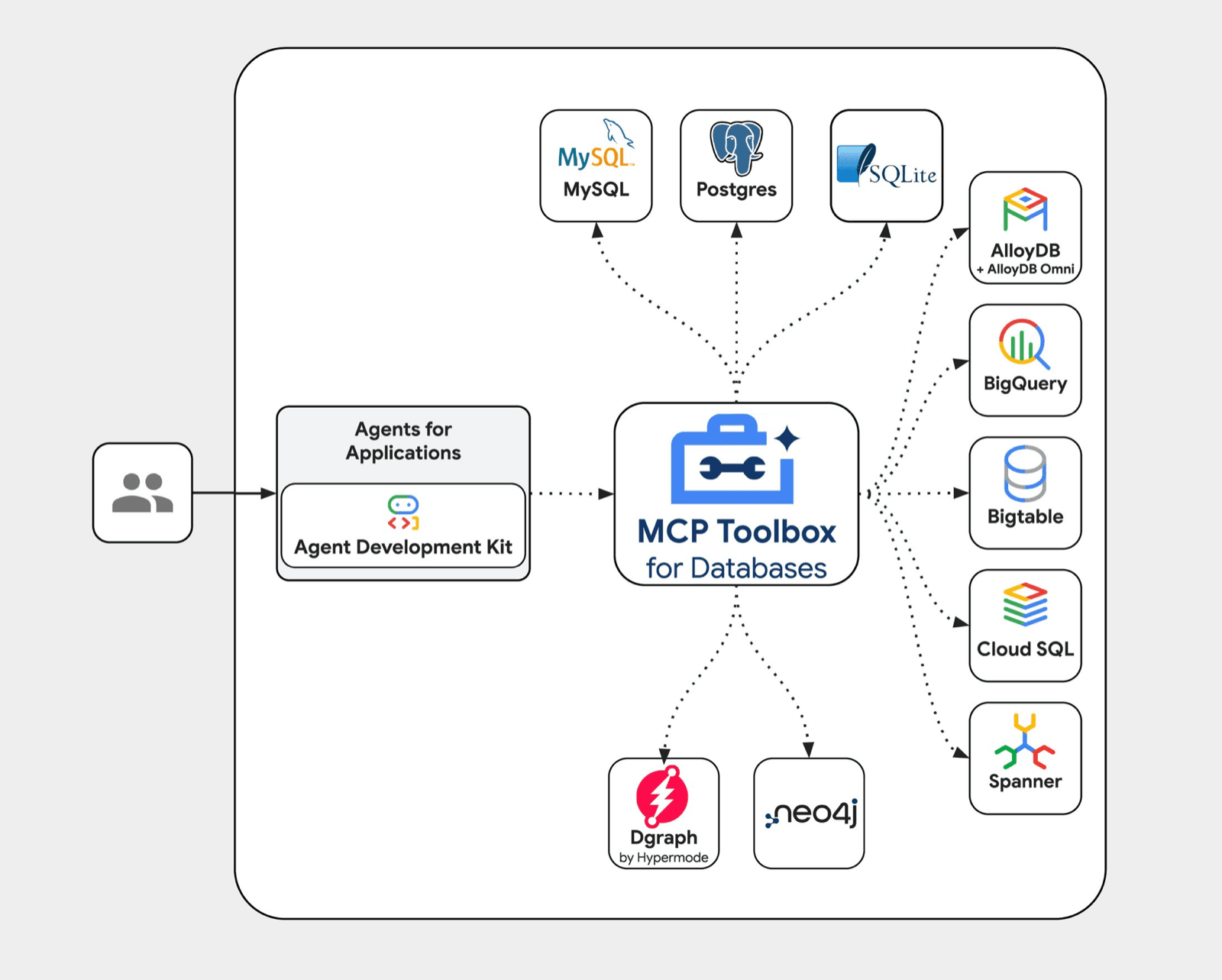
Every time I wanted an AI agent to talk to a database, I was back to writing the same scaffolding — connection pooling, credential management, parameterized query wrappers, error handling. Over and over, per project. Google's MCP Toolbox for Databases is a direct answer to that. It ships a production-grade MCP server as a single binary, and the only thing you configure is a YAML file.
This post is not a step-by-step installation tutorial — the official quickstart covers that. It's an explanation of what MCP Toolbox actually is, what problem it solves at the architecture level, and why it matters for anyone building AI agents against real data.
What Is the Model Context Protocol?
MCP is Anthropic's open standard for connecting AI models to external tools and data sources. Adopted by OpenAI in March 2025, it defines a wire protocol for how an AI client (Claude Code, Cursor, a custom LangChain agent) discovers, calls, and receives results from tools. Think of it as USB-C for AI integrations — one standard connector instead of a different cable per device.
Without MCP, every AI framework invents its own integration layer. With MCP, a tool you expose once is usable by any MCP-compatible client immediately, without any SDK-specific adapter code.
For the full protocol spec, the Anthropic MCP documentation is the authoritative source.
What Is MCP Toolbox for Databases?
MCP Toolbox for Databases is an open-source MCP server built and maintained by Google. It was previously called Gen AI Toolbox for Databases — the rename landed when Google committed to MCP as the integration layer for its agent ecosystem.
At its core it is middleware. It sits between your AI agent and your database, handling everything that isn't the query logic itself.
[Claude Code / Cursor / Cline / LangChain Agent]
               ↕  MCP Protocol
        [MCP Toolbox Server]
               ↕
[PostgreSQL / BigQuery / Spanner / AlloyDB / MySQL / ...]
The Toolbox handles:
- Connection pooling — reuses database connections across agent requests instead of opening a new connection per query
- OAuth2 and IAM authentication — credentials never touch your agent code
- OpenTelemetry instrumentation — every tool call is traced, so you have observability without adding it yourself
- Parameterized queries — SQL injection is mitigated at the framework level, not the application level
The surface area that remains yours: define which databases to connect to, and define which SQL queries your agent can run. Everything else is handled.
Supported Databases
The current database roster covers most of the production surface area a developer would care about:
- Relational: PostgreSQL, MySQL, SQLite, Cloud SQL, AlloyDB, AlloyDB Omni, Spanner
- Analytical / warehouse: BigQuery, Bigtable
- Graph: neo4j, Dgraph
This list is what makes MCP Toolbox genuinely useful for long-tail search scenarios. Someone building against BigQuery and searching "MCP Toolbox BigQuery" will find first-class support. Same for Spanner, neo4j, or AlloyDB. The Toolbox isn't a PostgreSQL-only solution dressed up as a general one.
The Real Value Prop
Before MCP Toolbox, connecting Claude Code to a PostgreSQL database looked like this: write a TypeScript tool definition, wire up a pg client, handle the connection string in environment variables, write parameterized query logic to avoid injection, add retry logic for connection drops, and register the tool with your MCP server. That's 80–100 lines of plumbing before you write a single line of actual agent logic.
With MCP Toolbox, the same integration is a tools.yaml entry:
sources:
  my-postgres-db:
    kind: postgres
    host: ${DB_HOST}
    port: 5432
    database: ${DB_NAME}
    user: ${DB_USER}
    password: ${DB_PASS}

tools:
  search-users-by-email:
    kind: postgres-sql
    source: my-postgres-db
    description: "Search users by email address"
    parameters:
      - name: email
        type: string
        description: "Email address to search for"
    statement: SELECT id, name, email, created_at FROM users WHERE email = $1 LIMIT 10;
That YAML is the entire integration. The Toolbox binary reads it, starts the MCP server, and any compatible client can immediately call search-users-by-email as a tool.
I spent real time tuning PostgreSQL schemas for Habiwine — indexing strategies, query planning, connection pool sizing. Having an AI agent that could directly explore and query that schema during the development cycle would have cut the iteration time significantly. The gap between "I want to understand this data" and "I'm actually querying it" would have collapsed from minutes of context-switching to a single tool call in the agent's conversation.
That is the feedback loop MCP Toolbox closes. Not just for me — for any engineer whose debugging and optimization workflow currently involves switching between the AI assistant, the database client, and the code editor.
How the Setup Works
The workflow is intentionally minimal. You download the Toolbox binary for your platform, write a tools.yaml that declares your data sources and the SQL tools you want to expose, and run the binary pointing at that config file.
# Run the toolbox server
./toolbox --tools_file=tools.yaml
The server starts on port 5000 by default and exposes both an MCP endpoint and a REST endpoint. From that point, any MCP client can connect and discover your tools through the standard MCP tool-listing handshake.
For detailed setup steps, the official Getting Started guide walks through the full quickstart. The point isn't the commands — it's that the entire integration surface is a binary and a YAML file. There's no SDK to vendor, no framework-specific adapter to write, no connection management code to maintain.
Failure Modes Worth Knowing
The YAML config approach trades flexibility for simplicity, and that tradeoff has sharp edges. If your query needs to join across database sources — say, PostgreSQL for user records and BigQuery for event data — you can't express that as a single Toolbox tool. You'd call two tools in sequence from the agent and assemble the result in the agent's reasoning context.
Connection pool exhaustion is another surface. Under high agent concurrency, if the pool size is misconfigured for your database's max connection limit, queries will start queuing. The Toolbox doesn't currently expose pool saturation as a health metric in the default configuration — you'd catch it through slow tool response times before you'd see an explicit error. Configure your connection limits deliberately and watch the OpenTelemetry trace latencies.
OAuth2 authentication with BigQuery and AlloyDB works cleanly when running on GCP with Workload Identity. Running locally with a service account key file requires explicit path configuration — the error message when this is misconfigured is a generic authentication failure, not a path hint. Factor in extra setup time if you're testing locally against a GCP-hosted database.
Who Can Use This Right Now
MCP Toolbox works out of the box with any MCP-compatible client. The confirmed client list includes:
- Claude Code (Anthropic's CLI) — add the Toolbox as an MCP server in your
.claude/settings.json - Cursor — via the MCP server configuration panel
- Windsurf and Cline — both support MCP server connections natively
- LangChain and LlamaIndex — via their MCP client adapter packages
- Custom agents — any agent that implements the MCP client spec can connect directly
This is the protocol's compounding value. Build the Toolbox config once, and every tool in that list gains database access without any per-client integration work.
For anyone building agents on AI-powered backends — the kind of multi-step, tool-using systems I walked through in LLM Calls to Autonomous Agents: Building with LangChain — MCP Toolbox removes one of the most persistent friction points: getting the AI agent to the data.
The Tradeoffs
MCP Toolbox is the right tool when your agent needs read-oriented access to databases for exploration, search, reporting, and analysis. The YAML-defined tool model scales well for a bounded set of queries against a stable schema.
It is the wrong tool when you need the agent to perform arbitrary schema modifications, run multi-step transactions, or execute queries that aren't known at configuration time. For those use cases, you're back to writing custom MCP tool definitions — MCP Toolbox just removes the boilerplate for the use cases it was built for.
There's also a config management question at scale. A tools.yaml with 30 tools across 5 data sources becomes its own maintenance surface. The Toolbox doesn't currently have a tooling ecosystem around config validation, diffing, or versioning — you're treating it like application config, which means your existing config management practices apply.
For a single project or a small agent with a focused data access pattern, the tradeoffs are easily worth it. For a large platform with dozens of agent behaviors and multiple teams contributing tool definitions, evaluate the YAML growth trajectory before committing.
What This Signals
MCP Toolbox is a small piece of infrastructure that signals a larger shift. When your AI assistant can safely read and query your production schema without you writing a single integration, the feedback loop between building and understanding your data collapses. Schema exploration, query debugging, anomaly investigation — tasks that currently require opening a separate database client, context-switching, and manually copying query results into the conversation — become native to the agent's workflow.
The operational question worth asking now is not whether to use MCP Toolbox. It's what your tools.yaml should look like for each project in your stack, and what the right query granularity is — broad enough to be useful, narrow enough to be safe.
References
- MCP Toolbox for Databases — Official Documentation
- Model Context Protocol Introduction — Anthropic
- Google Announces MCP Toolbox for Databases — Google Cloud Blog