SaaS Pre-Launch Audit: 5 Checks Before You Ship
When Skipping Audits Becomes a Strategy
The sprint to launch has a specific texture. The feature list is frozen, staging is passing, and the founder is pinging you for an ETA. You merge the last PR, push to production, and declare the product live.
Three months later, you are debugging an N+1 query that fires on every authenticated request. A security researcher emails to tell you environment variables are leaking through your API responses. Your cloud bill is four times the projection because an unbounded OpenAI call has been running on every request since day one.
None of this is bad luck. All of it was visible in the code before you shipped.
This is the checklist that catches the fires before they catch you. Five audits, each with a concrete scope, specific signals to look for, and the tools to run them. You can complete all five in one focused engineering day. You cannot afford to skip any of them.
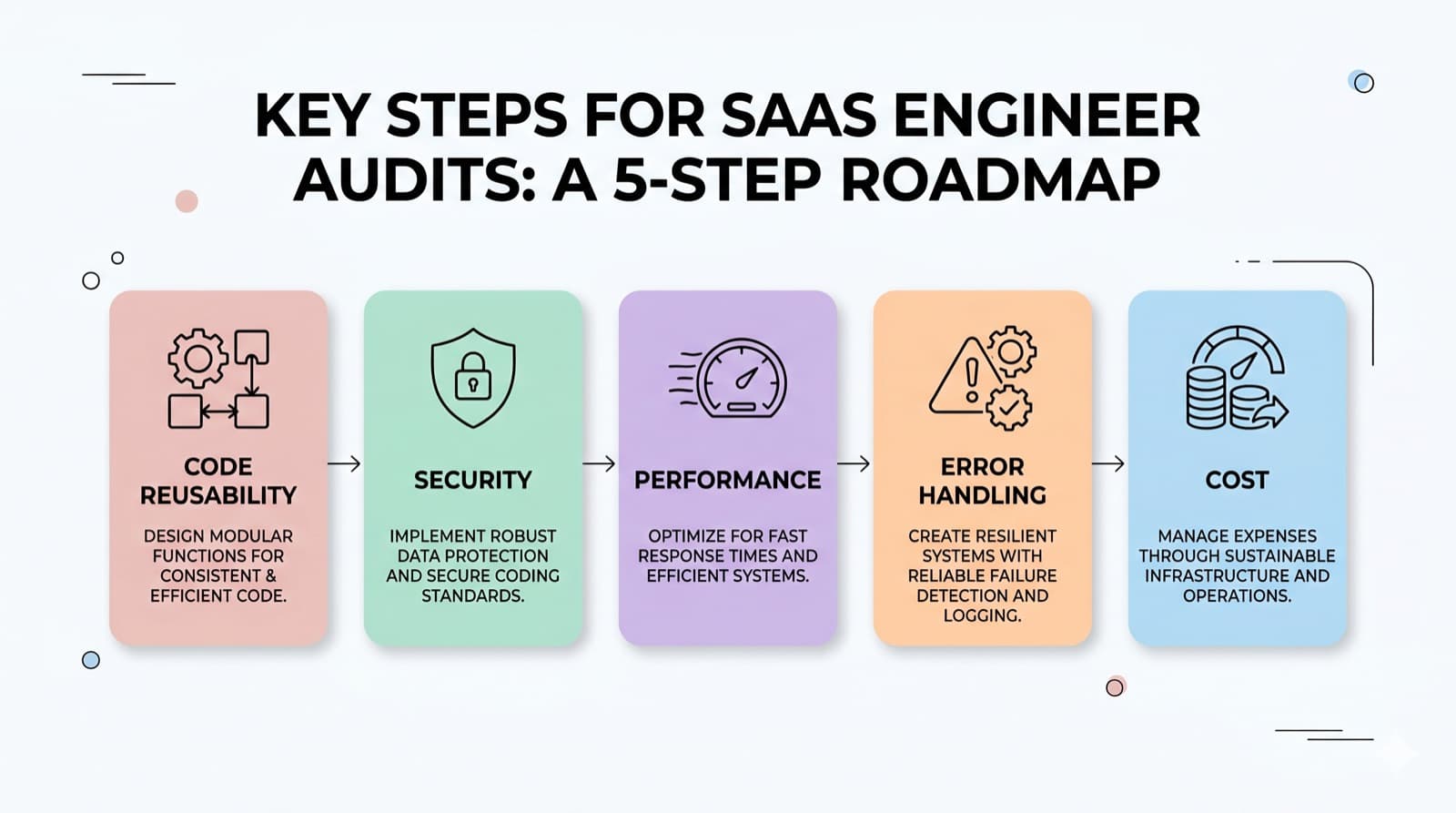
Audit 1: Code Reusability Audit
TL;DR: Duplicated logic is not a style problem. It is a maintenance bomb that detonates the moment you need to change shared behavior across twelve copies of the same function.
What to Look For
- Utility functions copy-pasted between frontend and backend instead of living in a shared module
- UI components that differ by three props but are implemented as four separate files
- API client instantiation scattered across service files instead of being centralized in one module
- Validation logic reimplemented in both the form layer and the API route
- Configuration constants hardcoded in multiple files with no single source of truth
- Custom hooks duplicating the same
useStateanduseEffectcombinations across three components
How to Run It
Start with a structural scan. jsinspect surfaces near-duplicate code blocks with configurable similarity thresholds. For TypeScript projects, ts-morph lets you walk the AST and flag functions with identical parameter signatures and return types.
Run knip to find unused exports and orphaned modules. These are often the leftovers of a half-completed refactor: the new shared module was created, but nobody updated all the callers.
For the frontend, count how many times similar data-fetching patterns appear across components. Any pattern appearing more than twice is a custom hook or shared query function waiting to be extracted.
What Bad Looks Like
A formatDate function living in utils/helpers.ts, lib/dateUtils.ts, and inline in two React components. When the formatting requirement changes (timezone support, locale-aware rendering), you update two of the four locations and ship a visual inconsistency that only surfaces for users in specific time zones.
What Good Looks Like
A single lib/format.ts module. One import path. One place to update. Every consumer automatically picks up the change without a codebase-wide find-and-replace.
Tools
jsinspectfor structural code duplication detectionts-morphfor AST-based analysis in TypeScript projectsknipfor finding unused exports and orphaned modules- Manual grep:
grep -rn "function formatDate" src/to spot scattered definitions
Audit Prompt
You are auditing a codebase for reusability problems.
Analyze the following file structure and source files.

Identify:
1. Utility functions defined more than once with the same or similar logic
2. React components that could be merged into a single parameterized component
3. API client or database connection setup duplicated across files
4. Validation logic that exists in both the frontend and backend independently
5. Configuration values or constants hardcoded in multiple locations

For each finding, output:
- File path and line number of each duplicate
- A suggested refactor (extracted function, shared module, or abstraction layer)
- Risk level: how much divergence has already occurred between the copies

Be specific. Do not flag normal variation between components as duplication.

[Paste relevant file contents here]
Audit 2: Security Audit
TL;DR: Most first-time SaaS security failures are not clever exploits. They are unprotected routes, exposed secrets, and missing input validation that any automated scanner finds in under a minute.
What to Look For
Environment variables:
- API keys, database URLs, or secrets committed to the repository at any point in git history (not just the current branch tip)
- Environment variables surfaced in API responses or server-side rendered HTML
- Next.js
NEXT_PUBLIC_prefix applied to server-only secrets, making them client-accessible
API routes:
- Routes performing user-specific operations without verifying the caller's identity
- Missing ownership checks: user A reading or modifying user B's resources because the route trusts the ID from the request body without validating it against the session
- Admin-only operations gated only by a client-side UI check with no server-side role verification
Authentication:
- JWTs signed with weak or hardcoded secrets
- Session cookies without
HttpOnly,Secure, andSameSiteflags - Password reset tokens with no expiry window
- OAuth callback handlers that do not validate the
stateparameter
Input handling:
- User-supplied strings injected directly into database queries
- File upload endpoints that trust the MIME type from the client
Content-Typeheader instead of validating server-side - Webhooks that process payloads without verifying the provider's HMAC signature
The Most Dangerous Misconception
Most engineers conflate authentication and authorization. Authentication asks "who are you." Authorization asks "what are you allowed to do."
A route can successfully verify your JWT while still allowing you to access any resource by ID, not just the ones you own. This is the Broken Object Level Authorization (BOLA) vulnerability class, and it is the most common finding in SaaS security reviews by a significant margin.
Check every route that accepts a resource ID parameter. Verify that the handler validates ownership against the session before executing the operation. This check takes five minutes per route and prevents the most common class of data leakage.
For a real-world case study on how a single compromised OAuth integration becomes a full credential breach, the breakdown in Vercel Breach 2026: The AI Tool That Opened the Door is worth reading before you wire up any third-party OAuth integrations.
Tools
git-secretsortrufflehogfor scanning the full git history for committed secrets- OWASP ZAP for automated scanning of live endpoints
npm auditfor known vulnerabilities in dependencies- Manual review of every route handler that touches user-owned data
Audit Prompt
You are conducting a security audit on a SaaS application.
Review the following code and identify vulnerabilities.

Check specifically for:
1. API routes performing authenticated operations without verifying the
   caller's session or JWT
2. Object-level authorization gaps: routes that accept a resource ID from
   the client without validating ownership against the authenticated user
3. Environment variable exposure: NEXT_PUBLIC_ or equivalent prefixes
   applied to secrets
4. Query construction using string interpolation or template literals
   with user-supplied input
5. Missing HttpOnly, Secure, or SameSite attributes on session cookies
6. JWT libraries configured with an empty, hardcoded, or weak secret
7. Webhook handlers that do not verify the provider-supplied HMAC signature
8. File upload handlers that trust the Content-Type header from the client

For each finding, output:
- File path and line number
- Vulnerability class (OWASP Top 10 category)
- Severity: Critical / High / Medium / Low
- One-line fix description

Only flag concrete code patterns, not hypothetical risks.

[Paste route handlers, middleware, and auth code here]
Audit 3: Performance Audit
TL;DR: A query taking 20ms against your dev database with 100 rows will take 4 seconds against your production database with 500,000 rows. Find the slow query before your first viral moment, not during it.
What to Look For
Database queries:
- ORM calls inside loops: fetching a list of records then calling
.findOne()on each item separately - Missing indexes on columns used in
WHEREclauses,JOINconditions, andORDER BYexpressions SELECT *when only two columns are needed, pulling 40 columns across every row in the result set- Unbounded queries with no
LIMITclause on list endpoints - Synchronous queries in the request/response cycle that could be deferred to a background job
The N+1 problem in practice:
A /dashboard endpoint fetches 20 user projects, then queries the database for the latest activity on each one. That is 21 queries per request. At 1,000 concurrent users, you are generating 21,000 database queries per second against an instance you sized for a development workload.
The fix is one JOIN or a batched IN (...) query. The diagnosis is query count per request, not query latency in isolation. If you are using Prisma, enable query logging middleware and watch the count on a single authenticated request. Any route making more than 3 queries is worth examining.
Caching:
- No caching layer between your API and the database for data that does not change per request
- Cache invalidation logic that busts too broadly, defeating the cache entirely
- No caching for repeated external API calls where the same input recurs frequently (geocoding, AI responses, enrichment services)
Frontend:
- Sequential request waterfalls where three fetches fire one after another, each waiting on the previous, when they could run in parallel
- Large client-side bundles loaded on every route when code-splitting would defer them to only the routes that need them
- Full-resolution images served to mobile viewports without resizing or format optimization
For a deeper look at frontend performance patterns that hold up in production, Next.js Performance Patterns I Use on Every Project covers code splitting, image optimization, and server component strategies in detail.
Tools
EXPLAIN ANALYZEin Postgres for per-query execution plans- Prisma query logging middleware for counting queries per request
clinic.jsfor Node.js performance profiling under load- Browser DevTools Network waterfall for frontend request sequencing
lighthouse CIfor automated Core Web Vitals regression detection in CI pipelines
Audit Prompt
You are auditing a production API for performance problems.
Review the following code.

Identify:
1. N+1 query patterns: loops containing database calls, or sequential
   queries that could be batched into one
2. Missing database indexes: WHERE, JOIN, or ORDER BY columns lacking
   an index declaration in the schema
3. Unbounded queries: list endpoints with no LIMIT, or queries that could
   return arbitrarily large result sets
4. SELECT * patterns: queries fetching all columns when only a subset
   is consumed downstream
5. Synchronous blocking operations in the request path that could be
   deferred (email sending, heavy computation, external API calls)
6. Repeated identical queries within a single request lifecycle that
   could be memoized or batched
7. Missing caching for expensive operations called repeatedly with
   identical parameters

For each finding, output:
- File path and line number
- Category: N+1 / Missing Index / Unbounded Query / Over-fetching /
  Blocking I/O / Missing Cache
- Estimated impact at scale: 100 users vs 10,000 users
- Specific fix recommendation

[Paste ORM models, schema definitions, and route handlers here]
Audit 4: Error Handling Audit
TL;DR: Silent failures are worse than loud ones. When nothing catches the error, the user gets a frozen UI and you get zero signal in your logs about what broke or where it originated.
What to Look For
Unhandled promise rejections:
asyncfunctions called withoutawaitand without a.catch()handler attachedPromise.all()calls where a single rejection causes all results to be discarded and the error is swallowed silently- Event handlers calling async functions inline with no error path
Missing error boundaries:
- React component trees with no
ErrorBoundarywrapping sections that make data requests - A single component error crashing the entire application instead of degrading only the affected section
- Error boundaries that exist but render nothing useful (a blank white box with no recovery message)
Silent API failures:
- HTTP calls that check
response.ok, log the error to the console, and returnnullto the caller - Callers that receive
nulland continue as if the operation succeeded - Webhook processing that responds
200 OKto the provider before confirming the internal operation succeeded, permanently losing the event if processing fails after the acknowledgement
Logging gaps:
console.logas the only observability mechanism in production- Errors logged with the message but without the stack trace, making the origin file and line invisible
- No request correlation IDs, making it impossible to trace a user-reported error through the log stream
What Happens in Production
A payment webhook fires. Your handler throws on a missing field in the payload. The handler is not wrapped in a try/catch. Node.js logs the unhandled rejection. The process does not crash. No alert fires.
The payment is never recorded. The user gets access. Your database shows no active subscription. Your support team receives an email three weeks later asking why the subscription expired when the user paid for it.
This failure is preventable at the code level and completely invisible without structured logging and alerting. The dangerous part: your uptime monitor reports green, your error rate metric shows zero, because the error was never captured in the first place.
Tools
eslint-plugin-promisewithno-promise-executor-returnandprefer-await-to-thenrules enabled- Sentry for production error capture with full stack traces and request context
react-error-boundaryfor consistent React error boundary implementationpinoorwinstonfor structured logging that replacesconsole.*in production
Audit Prompt
You are auditing a production application for error handling gaps.
Review the following code.

Identify:
1. Async functions called without error handling: missing try/catch, or
   .catch() handlers that swallow errors silently
2. Promise.all() or Promise.allSettled() usage where individual rejections
   are not surfaced or handled separately
3. React component trees lacking ErrorBoundary wrappers around
   data-fetching subtrees
4. API client calls that catch errors but return null or undefined to
   callers without propagating context
5. Webhook or queue handlers that acknowledge the event before confirming
   successful processing
6. console.log or console.error in production code paths that should
   be replaced with a structured logger
7. Error objects caught and rethrown without appending context,
   making the origin location ambiguous in logs
8. Background jobs or cron functions with no error notification path

For each finding, output:
- File path and line number
- Failure mode: what breaks silently and what downstream effect it causes
- Fix: the specific pattern to replace it with (structured try/catch,
  error boundary, dead letter queue, structured log call, etc.)

[Paste async functions, API handlers, and React component trees here]
Audit 5: Cost Audit
TL;DR: Every external API call has a price. With 10 users it is invisible. With 1,000 users on launch day, you discover you have been making that call on every keystroke since the beginning.
What to Look For
Unbounded AI calls:
- LLM completions triggered on every request without checking whether the result can be cached for identical inputs
- Streaming completions where the full output is assembled before use, paying for streaming latency without benefiting from it
- AI calls in render paths that fire on every component mount instead of on explicit user action
- Completions with no
max_tokensparameter set, allowing a single malformed prompt to exhaust an entire daily quota
Expensive operations on hot paths:
- Transactional emails triggered per-event (charged per-send by your ESP) for activity that could be batched into a daily digest
- Image processing on every upload request instead of a deferred background queue
- External enrichment calls (geocoding, company lookup, email verification) on every sign-up instead of being debounced or batched
Rate limiting gaps:
- No rate limiting on endpoints that call paid external APIs
- No per-user or per-IP limits on compute-intensive operations
- No circuit breaker on third-party dependencies, causing unbounded retry storms that amplify your bill during a provider outage
Storage and egress:
- Log verbosity set to
DEBUGin production, filling log ingestion quotas within hours of a traffic spike - No TTL or archival policy on database records, query logs, or audit trails
- Full-resolution file storage with no lifecycle rule to transition older assets to cheaper storage tiers
How It Goes Wrong Overnight
You add AI-powered search. It calls your LLM provider on every keypress with no debounce. During a ProductHunt launch, 500 users are actively searching at the same time. Each user generates 30 keypress events per minute. You are making 15,000 API calls per minute at $0.002 per call. That is $30 per minute, $1,800 per hour. By the time the Stripe charge notification hits your inbox, you have spent the equivalent of three months of runway on one afternoon of traffic.
The fix is one debounce wrapper and a result cache. The audit catches it before you pay for it.
Tools
- AWS Cost Explorer or Vercel Analytics for per-service spend breakdown
bottleneckorp-limitfor rate limiting concurrent async operations in Node.js- Redis or Upstash for a low-overhead caching layer on repeat API calls
- LangSmith or Helicone for per-call LLM cost tracking and usage visibility
Audit Prompt
You are auditing a SaaS application for cost exposure.
Review the following code.

Identify:
1. LLM or AI API calls that fire without explicit user intent (on mount,
   on keystroke, on every request) rather than on deliberate user action
2. External API calls with no caching where the same input recurs
   across requests
3. Expensive operations (image processing, PDF generation, data
   enrichment) in synchronous request handlers that could be deferred
   to a background queue
4. Endpoints with no rate limiting that call paid third-party services
5. LLM calls with no max_tokens set, embeddings with no batching,
   or API calls with no timeout configured
6. Email or notification sending triggered per-event instead of
   batched per-user per-interval
7. Log statements or telemetry with development-level verbosity
   running in production
8. Storage writes with no TTL, archival, or retention policy

For each finding, output:
- File path and line number
- Cost category: Compute / API / Storage / Egress
- Estimated cost at scale: 100 users / 10,000 users / 1M requests
- Fix: debounce, cache, queue, rate limit, or config change

[Paste API route handlers, service layer, and client-side data fetching code here]
The Launch Is the Starting Gun
Five audits. One engineering day. The kind of day that does not feel productive because you are not shipping features, but that prevents the three production fires that would each cost you ten days to diagnose and fix under pressure.
Skipping them is a bet. The bet is that none of the failure modes surface before you have the runway and the engineering hours to address them reactively. That bet loses more often than it wins, and it loses at the worst possible moments: during your first traffic spike, when a security researcher finds you before you do, when a duplicated validation function silently diverges and ships incorrect data to users.
The codebase you push on day one sets the ceiling for how fast you can move for the next six months. A codebase with duplicated logic, unprotected routes, a slow query on the critical path, swallowed errors, and an unbounded API call is a codebase that will resist every feature you try to add on top of it.
Run the audits. Ship the product. Then keep building on a foundation that does not fight you.
If you want to see what production-grade architecture looks like in practice, take a look at the projects section.